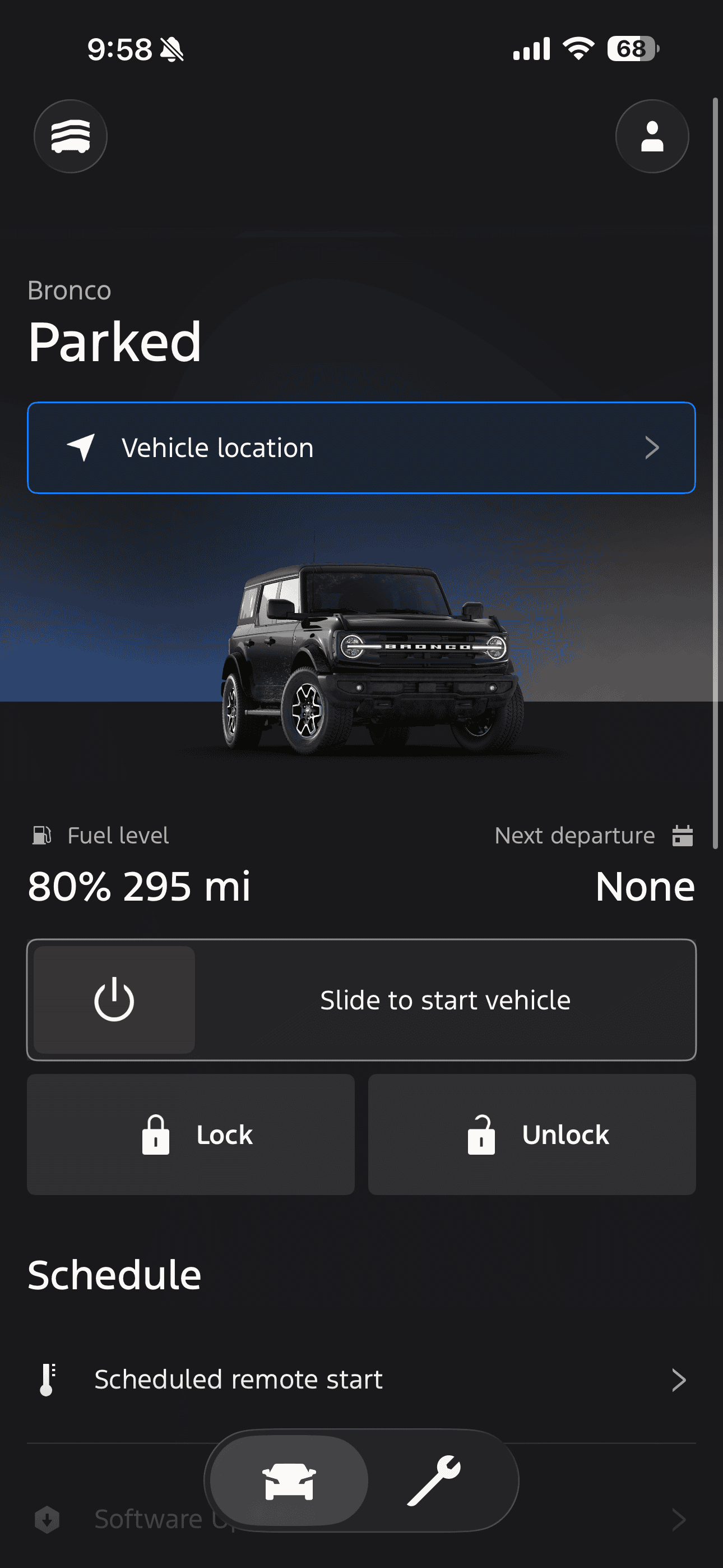
Wrong Image of Bronco on Ford App

scottwilkie
Jan 05, 2026

Scott

Mon at 3:00 am

I know this is a very picky post, but since I’ve gotten my bronco and linked it to the Ford app, it’s always shown the wrong roof. Or does every bronco in the ford app show the soft top? I have the hard top. Just curious if anyone knew a fix for this or if this is just how it is. I have tried logging out and logging back in and uninstalling and reinstalling the app. Thanks!
Moderator

Life is a Highway

Mon at 3:07 am

#1
Did you put it in with your Vin? All three of my vehicles are specific to the vin and are accurate.
the poacher

Scott

Mon at 3:16 am

#2
Did you put it in with your Vin? All three of my vehicles are specific to the vin and are accurate.
I did put a VIN in. Should I retry? Is there like a specific “style” number to use?

Edit: just realized I can’t edit the VIN lol. So not sure

EVs are the blood diamonds of the car world

Mon at 6:06 am

#3
Mine shows correct. Perhaps contacting Ford can get their IT to help? You can't change the VIN but can you remove the Bronco entirely and re link it ? I have removed old vehicles from mine.
Supreme Leader of the Wandering but NOT Lost
2022 OBX Cyber Orange Metallic with random acutriments.
Rydfree

Rank V

Mon at 2:31 pm

#4
I know this is a very picky post, but since I’ve gotten my bronco and linked it to the Ford app, it’s always shown the wrong roof. Or does every bronco in the ford app show the soft top? I have the hard top. Just curious if anyone knew a fix for this or if this is just how it is. I have tried logging out and logging back in and uninstalling and reinstalling the app. Thanks!

Good morning. Can you send us a private message with more information? I’ll see how I can assist on my end.
the poacher, Lug Nut

KFG

Mon at 5:28 pm

#5
Just curious about whether you bought your Bronco new (ordered by you) or previously owned… could be your VIN was originally a soft top.

If you can’t edit your VIN, what I would do is delete the vehicle in Ford app and then add a new vehicle with the VIN…

Good Luck
Riding OB1, 23 4- door Outer Banks, SAS, MOD, MIC, Lux, Ordered 10/20/22, delivered 1/13/23

Rank IV

Mon at 8:42 pm

#6
Funny thing is when you look at tire pressure on the app and it appears to be an F150 SuperCrew as the overhead image for the vehicle. Does this on my Bronco and Expedition both.

No More Mondays❗️

Mon at 9:18 pm

#7
Funny thing is when you look at tire pressure on the app and it appears to be an F150 SuperCrew as the overhead image for the vehicle. Does this on my Bronco and Expedition both.

Interesting! I get the same image (F150 SuperCrew) also on the tire pressure screen for my Bronco and Explorer. However, my Escape has the correct image, an overhead view of a black escape!
‘23 Hot Pepper Red Wildtrak 2.7L-V6 4 dr. MIC Sas Lux and Lovin’ it!!

Rank III

Tue at 5:15 pm

#8
I wish we could edit the pic and upload what we want, this would be cool!

Attachments

the poacher, TK1215

Rank V

Yesterday at 1:01 am

#9
I wish we could edit the pic and upload what we want, this would be cool!

I agree. I asked this before and was told it can't be done. But this was before I found out the help desk doesn't understand a lot about the I/T side of the house. In my 2009 JK, I could load pictures to the on board and have them show as screen savers, etc. Could also load music to the on board and not have to plug in a USB, etc to play back music. Let's see 2009 Jeep vs. a 2021 Ford. I know the I/T world has improved, but not Ford??
RobWTx

EVs are the blood diamonds of the car world

Yesterday at 7:09 am

#10
Just curious about whether you bought your Bronco new (ordered by you) or previously owned… could be your VIN was originally a soft top.

If you can’t edit your VIN, what I would do is delete the vehicle in Ford app and then add a new vehicle with the VIN…

Good Luck
Are you suggesting to use a VIN that has the desired image? The VIN is attached to the app specifically to each vehicle otherwise you'd be attaching all your records, mileage, services ect to someone else's vehicle. The location and app remote services would also be attached to another's vehicle wandering into some murky legal waters. Or perhaps I am misunderstanding and you're saying like I was for the OP to delete and re enter their VIN.
Supreme Leader of the Wandering but NOT Lost
2022 OBX Cyber Orange Metallic with random acutriments.

Rank 0

Yesterday at 12:09 pm

#11
My app shows my Bronco exactly as I configured it. My wife’s Explorer matches as well, but my 2011 F150 is way off. I thought that was because the truck is older than the app, but I’ll check my VIN to be sure it is correct in the app.

Rank 0

Yesterday at 12:29 pm

#12
My app shows my Bronco exactly as I configured it. My wife’s Explorer matches as well, but my 2011 F150 is way off. I thought that was because the truck is older than the app, but I’ll check my VIN to be sure it is correct in the app.

I checked and my VIN is a match to the app. My truck is a tan XLT and it shows a different trim in brown. My guess is they don’t have the images for all of the different vehicles colors/trims readily available from that far back.

KFG

Yesterday at 11:44 pm

#13
Are you suggesting to use a VIN that has the desired image? The VIN is attached to the app specifically to each vehicle otherwise you'd be attaching all your records, mileage, services ect to someone else's vehicle. The location and app remote services would also be attached to another's vehicle wandering into some murky legal waters. Or perhaps I am misunderstanding and you're saying like I was for the OP to delete and re enter their VIN.
The point I was making is that if the vehicle was previously owned, the original owner might have switched out the top.

The VIN (and corresponding image) would correctly reflect the vehicle as it came from the factory…

Were it me I would try deleting and re-adding the vehicle…

ps- my ’23 Sasquatch shows perfectly on my app, as does my Maverick and F150
Riding OB1, 23 4- door Outer Banks, SAS, MOD, MIC, Lux, Ordered 10/20/22, delivered 1/13/23

OrangecrushBronco

Rank 0

Today at 2:29 am

#14
My roof on the app also show soft top. Do you have the shadow black painted hardtop? I have the shadow black hard top painted and assumed they couldn’t get a decent picture to put in the app.
Bluestreak57

You must log in or register to post here.